







Quick Answer
How do you save an Instagram story? Open your profile, tap the menu (☰), go to Archiving and downloading and turn on Save story to archive and Save story to camera roll/gallery. Every story you post is then kept automatically. For an expired story, open Archive, pick it, tap More and choose Save photo or Save video.
Source: Instagram Help Center. Menu names can vary slightly by app version.
Instagram story save settings are the difference between keeping a memory and losing it forever after 24 hours. Maybe you posted your best friend’s birthday surprise, a trip sunset, or a product launch for your small business, and now it has vanished from your profile. The good news: if a few switches were on, it is still sitting in your account.
This Chasale guide covers every official way to save your own stories, the safe way to keep someone else’s, and the story saver apps that can cost you your account. Everything here uses Instagram’s own features first, because they are free, private and do not ask for your password.
Instagram Story Save Settings: Turn On Auto-Save Once
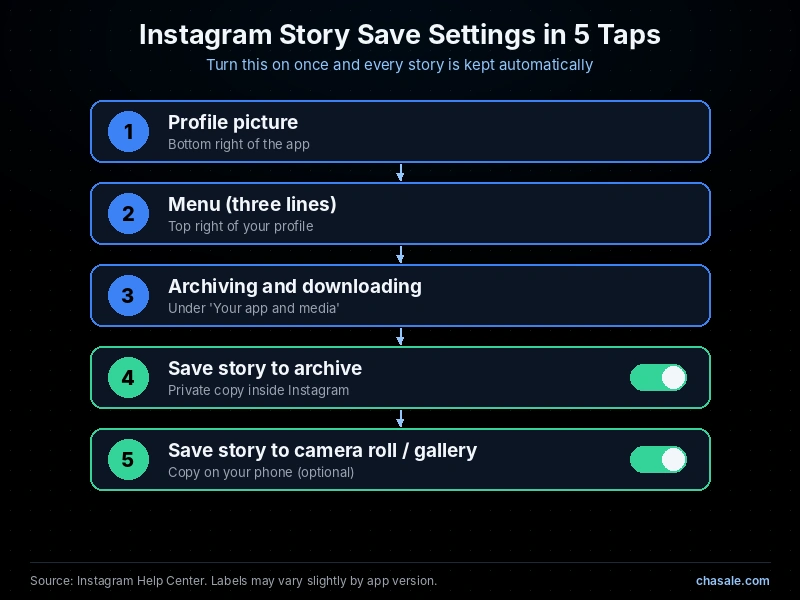
Two settings decide where your stories end up. Set them once and you never have to think about it again.
Steps (Android and iPhone):
- Open Instagram and tap your profile picture at the bottom right.
- Tap the menu (☰) at the top right.
- Under Your app and media, tap Archiving and downloading.
- Turn on Save story to archive.
- Turn on Save story to camera roll (iPhone) or Save story to gallery (Android) if you also want a copy on your phone.
Archive vs camera roll: which one do you need?
| Story Archive | Camera roll / Gallery | |
| Where it lives | Inside Instagram, private to you | Your phone’s photo app |
| Uses phone storage | No | Yes |
| Works if you lose your phone | Yes, log in on any device | No, unless your gallery is backed up |
| Lets you make Highlights later | Yes | No |
| Default | Usually on | Usually off |
The safest combination is archive on for everyone, and camera roll on only if you edit or reuse your stories outside Instagram. Creators who repurpose stories into Reels usually want both.
How to Save a Story You Already Posted
If the story is still live (under 24 hours)
- Tap your profile picture to open your story.
- Tap More (three dots) at the bottom right.
- Tap Save, then choose Save photo or Save video.
On iPhone you may also see Save story, which joins all your current stories into one vertical video. On Android, each story is saved one by one.
If the story has already expired
- Go to your profile and tap the menu (☰).
- Tap Archive. Make sure Stories archive is selected at the top.
- Open the story you want, tap More, then Save photo or Save video.
If your archive is empty, the archive setting was off when you posted. Instagram cannot recover stories that were never archived, which is why the auto-save step above matters.
Keep Stories Forever With Highlights
Archived stories are private. If you want a story to stay visible on your profile, turn it into a Highlight.
- Open the story (live or from your Archive).
- Tap Highlight at the bottom of the screen.
- Pick an existing Highlight or tap New, give it a name and tap Add.
Highlights appear as circles under your bio and stay there until you remove them. Small businesses use them as a free mini-catalogue: “Prices”, “Reviews”, “Delivery areas”. One caution: a Highlight is visible to anyone who can see your profile, so on a public account, avoid highlighting stories that show your home location, school or daily routine.
Download All Your Old Stories at Once
Saving one story at a time is slow if you have years of them. Instagram’s data export tool, now inside Meta’s Accounts Center, lets you download your archived stories, posts and other information together.
- Go to your profile, tap the menu (☰), then Accounts Center.
- Tap Your information and permissions.
- Tap Export your information (some versions call it Download your information).
- Choose your Instagram account, select what to include, the date range, the format and the media quality.
- Submit the request. Instagram emails you when the file is ready to download.
You get a ZIP file. Open it on a computer for the easiest browsing. If you are moving to another service, the same section also has a Transfer a copy of your information option that can send stories, including archived and Close Friends stories you created, directly to supported services.
Saving Someone Else’s Story: What’s Okay and What Isn’t
This is where most people get into trouble, so here are the options from safest to riskiest.
1. You were mentioned in it. When someone tags you, you get a direct message with the story and an Add to your story button. This is the cleanest way to reshare, because the original creator is credited automatically. The creator can turn off reshares, in which case the button will not appear.
2. It is a public story. In early 2026, Instagram began showing an Add to story option on some public stories even if you are not tagged. If you see it, use it; the reshare keeps the original account visible.
3. Ask. For a friend’s story, simply asking “Can you send me that?” gets you the original file in full quality, with no awkwardness later.
4. Screenshot or screen recording. Fine for personal reference, such as saving a recipe, an event poster or a sale code. Reposting it as your own content is a different matter.
5. Third-party downloader sites and apps. These pull stories from Instagram’s servers without the account owner’s involvement. Instagram’s Terms of Use do not allow accessing or collecting information in unauthorised ways, and Instagram says it has teams that detect and block this kind of data scraping. Using them is a grey area at best, and the bigger risk is to your own account security (see the red flags section below).
Close Friends stories deserve extra respect
If someone shared a story with only their Close Friends list, they chose a small audience on purpose. Saving and forwarding it, even “just to one person”, breaks that trust. And remember copyright: the person who created a photo or video owns it. Reposting it without permission, especially for business promotion, can lead to a takedown or a report against your account.
Does Instagram Notify When You Screenshot a Story?
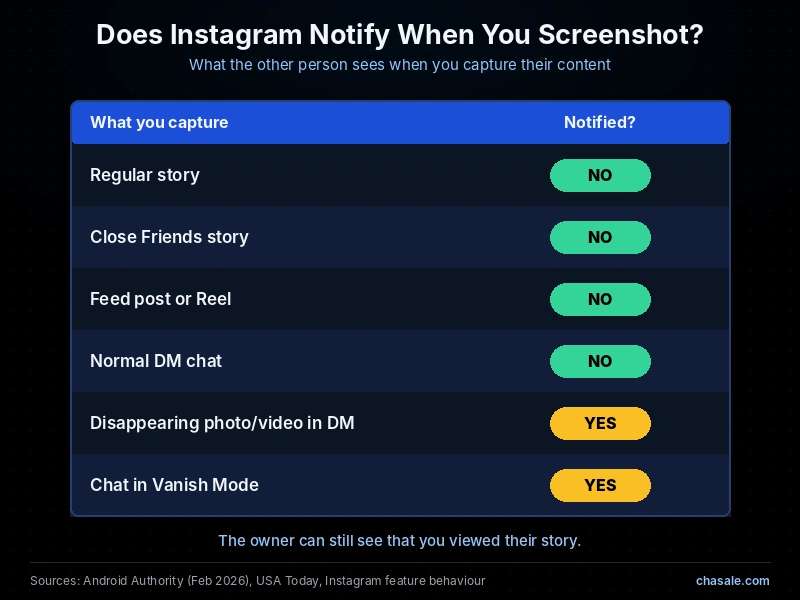
No. Instagram does not tell anyone when you screenshot or screen record their regular story. The notification only appears in a narrow set of private message situations.
| What you capture | Does the other person get notified? |
| Regular story | No |
| Close Friends story | No |
| Feed post or Reel | No |
| Normal DM chat | No |
| Disappearing photo or video sent in DM | Yes |
| Chat in Vanish Mode | Yes |
Keep in mind that the story owner can always see that you viewed their story. Only the screenshot itself goes unannounced. “No notification” also does not mean “no consequences”: if a screenshot of a private story gets shared around, people usually figure out who took it.
Story Saver Apps and Sites: 5 Red Flags
Story saver tools are popular, and some are harmless. Others are built to steal accounts. Watch for these warning signs:
- It asks for your Instagram password. Downloading a public story never needs your login. A tool asking for it may be harvesting credentials.
- It claims to open private stories. No legitimate tool can bypass a private account’s settings. A promise like that is usually bait.
- It pushes a weekly subscription. Some saver apps on official app stores charge weekly plans in the range of several dollars a week. Check the price screen before you tap “Continue”.
- It wants extra permissions. A story downloader has no reason to access your contacts, SMS or accessibility settings.
- Its reviews look odd. Very few reviews, all five stars, or a sudden flood of identical praise are warning signs.
This is not a theoretical risk. An app called InstaAgent, which promised to show users who viewed their Instagram profile, sent users’ login details to an unknown server and was removed from both major app stores after nearly half a million downloads on the Apple App Store alone. The same developer later relaunched it under a new name.
Already entered your password into a saver app? Change your Instagram password immediately, turn on two-factor authentication, log out of all other sessions from Accounts Center > Password and security, and uninstall the app. If you reuse that password anywhere else, change it there too. For broader device safety, our guide on how to protect your devices from malware walks through the basics.
Troubleshooting: Why Your Story Isn’t Saving
“My old stories are not in the archive.” The Save story to archive setting was probably off when you posted them. Turn it on now; it works only for future stories.
“The saved video has no music.” Stories that use licensed songs from Instagram’s music library may save without the audio, or show a “Save without audio” prompt, because of music licensing. Keep the original clip and the song name if you plan to reuse it.
“The saved photo looks blurry.” A saved story is a compressed copy. If quality matters, keep the original photo or video you uploaded, which is another reason to turn on camera roll saving.
“Nothing happens when I tap Save.” Check that Instagram has permission to access your photos in your phone’s settings, and that your storage is not full. Updating the app fixes many save errors too. For other everyday phone glitches, see how we fix common phone issues in simple steps.
Which Method Should You Use? (Quick Decision Table)
| What you want to save | Best method |
| Your story, every time | Turn on archive and camera roll auto-save |
| Your story that expired | Archive > More > Save |
| A story to show on your profile | Add it to a Highlight |
| All your stories from past years | Accounts Center > Export your information |
| A story you were tagged in | Add to your story from the DM |
| A friend’s story | Ask them to send the original |
| A public brand or event story | Use Add to story if shown, or screenshot for personal reference |
| A private account’s story | Do not try. No legitimate tool can do it |
Frequently Asked Questions
How do I save an Instagram story with music?
Save it from your own story or archive using More > Save. If the track is licensed from Instagram’s library, the file may save without audio. Keeping the original clip and adding the song again in an editor is the most reliable workaround.
Can I save someone else’s Instagram story without them knowing?
Instagram does not notify people about story screenshots or screen recordings, though they can see that you viewed the story. Whether you should save it is a separate question; for anything personal, asking first is the respectful option.
Where do archived Instagram stories go?
They go to your private Stories Archive. Open your profile, tap the menu (☰), then Archive, and select Stories archive at the top. Only you can see them.
Can I download a private Instagram story?
Not through any legitimate method. Private accounts limit stories to approved followers, and tools claiming to bypass this are a common route for scams and account theft.
Is it legal to download Instagram stories?
Saving your own stories is completely fine. Downloading other people’s content through third-party tools goes against Instagram’s Terms of Use on unauthorised data collection, and reposting someone’s photo or video without permission can infringe their copyright.
Why can’t I find my old stories in the archive?
Stories are archived only if the Save story to archive setting was on when you posted them. Instagram cannot restore stories that were never archived.
Can story saver apps get my account banned?
Instagram restricts accounts it links to unauthorised data collection, and apps that log in with your credentials can trigger those checks or hand your account to someone else. Avoid any tool that asks for your password.
More Simple Tech Guides on Chasale
If this helped you rescue a story, bookmark it for the next time a friend asks. Chasale explains everyday tech in plain language, from phone fixes to staying safe online. Browse the Technology section for more, and share this guide with someone who keeps losing their best stories after 24 hours.
Disclaimer: Chasale is not affiliated with Instagram or Meta. Instagram updates its app regularly, so menu names and steps may differ slightly on your device. For the latest instructions, check the Instagram Help Center. This article is general information and not legal advice.
